How the Built-in HUD Works in CoinPoker
The CoinPoker platform continues to expand its professional-grade features, and one of the most powerful tools available to players is its built-in Heads-Up Display (HUD). As the third major poker network to introduce integrated table statistics—following GGPoker and iPoker—CoinPoker gives players access to real-time data without requiring external software.
- Rakeback Contact us
- Deposit bonus 2000$
available mobile application
option of playing in OFC
many software languages to choose from
low traffic
payment option only via crypto
What Is the Built-in HUD on CoinPoker?
The CoinPoker HUD is an in-client statistical tool that displays key player metrics directly on the poker table. Instead of relying on third-party tracking programs, the platform records every hand played and automatically generates statistics that reflect each player’s tendencies.
The system calculates 10 core metrics used by serious poker players to evaluate opponents. These statistics help identify whether someone plays loose or tight, aggressive or passive, and how they react to different betting situations.
CoinPoker does not publicly disclose the exact number of hands required for the HUD to generate reliable statistics. However, players can control the time range of the data displayed. In the settings menu, you can choose whether the HUD uses information from the last 15 days, 30 days, 90 days, or the full lifetime of recorded hands.
Another important feature is that statistics for cash games and multi-table tournaments are tracked separately. This allows players to evaluate opponents more accurately depending on the format being played.
HUD Interface and How It Works at the Table
The HUD interface is designed to be simple and accessible while still providing detailed data.
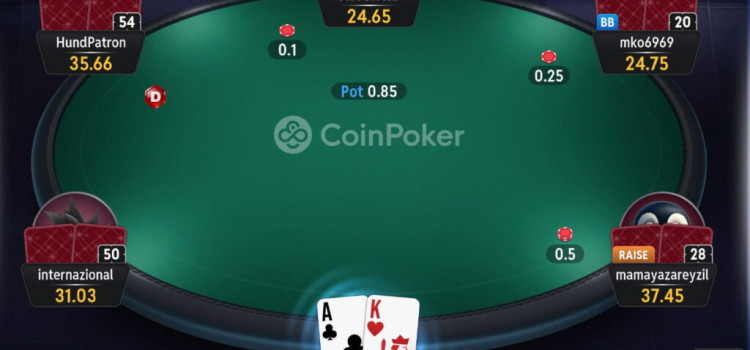
At each table, a small HUD icon appears in the upper-right corner of every player’s avatar. This icon shows the VPIP statistic, which is one of the most important indicators of playing style.
Hovering your mouse over the icon opens a small pop-up window displaying four key stats for quick reference. This allows you to quickly evaluate opponents without interrupting the flow of the game.
Clicking the icon opens the full HUD panel, which contains all 10 statistics along with additional tools. Within this panel, you can also write personal notes about opponents and assign color labels to categorize different player types.
CoinPoker also integrates a direct link to PokerIntel, the platform’s built-in analysis tool, allowing you to review hands and gain deeper insights into gameplay patterns.
In tournament games, the HUD panel also displays each player’s position in the Skill Score rankings. There is also a Career tab that highlights their most notable tournament achievements, giving you additional context about the level of competition at your table.
The 10 Key HUD Statistics Explained
The CoinPoker HUD tracks ten core metrics widely used in professional poker analysis.
VPIP (Voluntarily Put Money in Pot) shows the percentage of hands where a player voluntarily enters the pot before the flop by calling, raising, or going all-in.
PFR (Pre-Flop Raise) indicates how often a player raises before the flop, providing insight into their level of aggression.
WTSD (Went to Showdown) measures how frequently a player reaches showdown after seeing the flop.
WSD (Won Money at Showdown) reveals how often a player wins when they do reach showdown.
3-Bet tracks how often a player re-raises after an initial raise, a key indicator of aggressive play.
Fold to 3-Bet shows how often a player folds when facing a re-raise.
C-Bet (Continuation Bet) measures how often a player who raised preflop continues betting on the flop.
Fold to C-Bet reveals how frequently players give up when facing a continuation bet.
Steal tracks how often a player raises preflop in an attempt to win the blinds uncontested.
Check-Raise records situations where a player checks with the intention of raising after an opponent bets.
Together, these statistics provide a detailed picture of how each opponent plays, allowing you to quickly recognize patterns and adapt your strategy accordingly.
Start Playing on CoinPoker with DonkHunter
If you want to take full advantage of CoinPoker’s built-in HUD and other advanced poker tools, the best way to get started is through DonkHunter.
By signing up through DonkHunter, you gain access to exclusive benefits, rewards, and guidance designed to help players maximize their results on CoinPoker.
Create your account today through DonkHunter and start using CoinPoker’s built-in HUD to analyze opponents, refine your strategy, and gain an edge at the tables.
Poker rooms

BetKings
- Rakeback up to 60%
- Deposit bonus 600$

PokerKing
- Rakeback up to 65%
- Deposit bonus 1000$

CoinPoker
- Rakeback Contact us
- Deposit bonus 2000$

Tiger Gaming
- Rakeback Contact us
- Deposit bonus 1000$

Unibet.fr
Recent blog & news
The Excellent Habits of Being a Poker Pro
We will talk about professionalization in poker and how it can be achieved in a systematic way as in other professions, be it mathematician, lawyer, accountant,...
WPT Global: World Poker Tour official online poker room
This new poker room has the world-famous WPT brand and kicked off last month. It already has hundreds of online players and up to a $1200 deposit bonus! Let's discuss...
Best Suprema Poker Clubs Review
Learn all about the Suprema Poker app and the best clubs according to the type of games and stakes of your choice.